Solution Overview
EMT BrAIn is the brain of Flezi EMT: a neuroscience-inspired AI layer that fixes the four failures of sustained agent work — context erosion, session amnesia, tribal knowledge lock-in, and invisible spend — powering 300+ Skills · 60+ Agents · 30+ Workflows across all four modernization strategies.
The Problem — Four Failures That Repeat on Every Project
AI coding agents are powerful but brittle over sustained sessions — and the fourth failure is the one nobody measures.
| Failure | What Happens | Business Impact |
|---|---|---|
| Context erosion | Raw tool output floods working memory — 30 minutes of work consumes 40%+ of the context window with data the task never needed. | Accuracy drops; token cost rises with no productivity gain. |
| Session amnesia | Every compaction or restart wipes memory — decisions, in-progress files and active tasks are all gone. | Engineers re-explain the same context, session after session. |
| Tribal knowledge lock-in | Skills, domain patterns and architectural decisions live in people's heads or scattered files, with no delivery mechanism. | Every session starts from zero. |
| No line of sight on value | Nobody can say what the agent cost, what it produced, or whether the two are in the right order — spend is defended by anecdote. | AI budget cannot be justified, scaled or governed. |
Left unresolved: these failures turn AI from a productivity multiplier into a productivity drain.
The Solution — EMT BrAIn — 5 Modules
One architecture, two products: EMT BrAIn Edge on the engineer's machine, the Flezi EMT Platform across the organization.
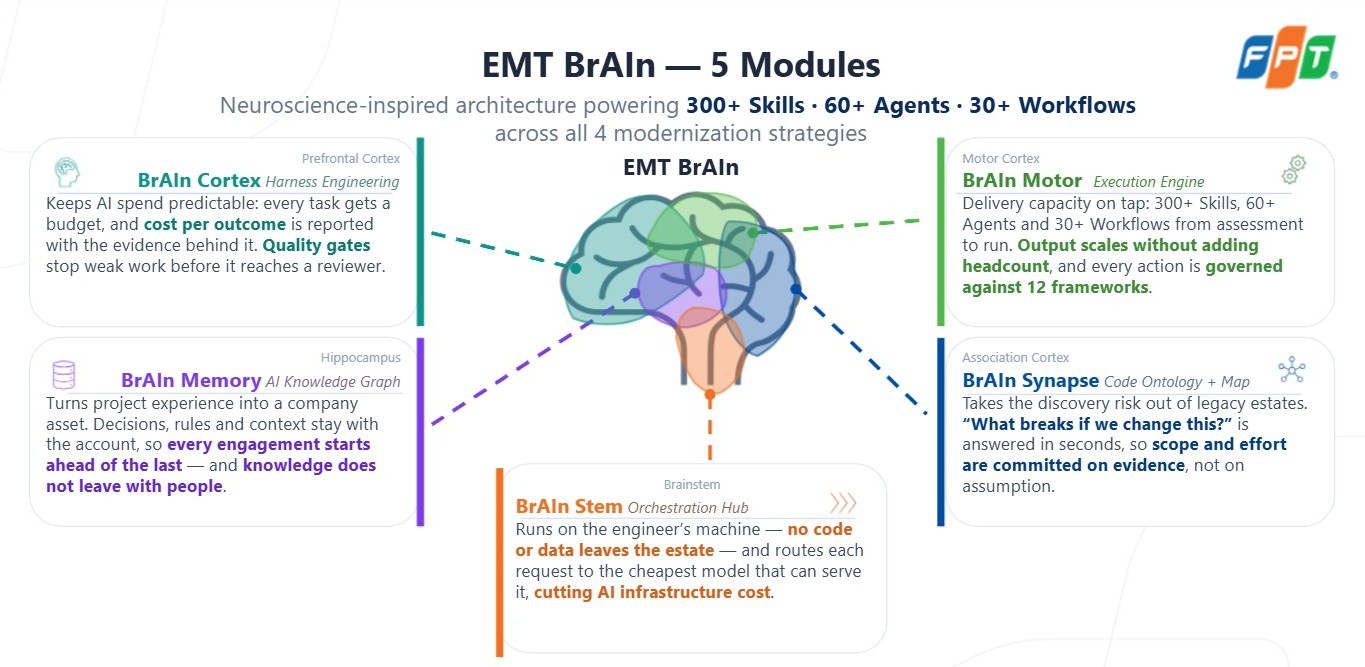
Module Highlights
Cortex
Filtration, suppression and compression before the model sees context. Context budget checked every turn: 50% warn → 60% advisory → 70% block. Session traces, per-minute burn, context health and value, all read from one dataset — savings always reported net of EMT's own overhead.
Motor
Every capability is a plugin with one install lifecycle. Runtime policy gate mapped to twelve frameworks, fail-closed on error. Outcome scoring, anti-patterns, and a skill finder that proposes new skills from real usage — a person signs them off. Only 2–3 relevant capabilities surface at session start.
Memory
Tool events distilled into observations, then lessons and crystals. Fused BM25 + vector + graph recall injected before the first prompt, with on-device embeddings — no API key, no network call, no per-token cost. <private> content stripped and path rules enforced at the hook layer.
Synapse
Layer 1, deterministic: same commit in, same graph out — tree-sitter AST for TS/JS/Java/Py/Go/C#. Layer 2, model-assisted: labels stored as annotations, never merged in as parsed facts. Provenance badge on every edge; impact in seconds — what calls X, who uses Y, what a rename touches.
Stem
Passthrough to Anthropic by default; eleven upstreams (p0–p10) with a per-upstream force switch. Catalog of 31 models from 7 vendors, priced per million tokens on one editable table. The on-device pair — Kompressor and the embedding model — costs nothing per token.
Edge and Platform — On the Machine, and Across the Organization
Local vs Global Control Plane
Two control tiers: EMT BrAIn Edge orchestrates each developer's AI agents locally; the platform monitors all instances from above, over one control / telemetry / catalog-sync channel.
Flezi EMT Platform — Global Control Plane
-
Observability Hub
- Session browser (N instances)
- Cost + Anomaly dashboard
- Quality scores
- Skill topology
- Agent fleet
-
Autonomous agents
- Motor (300+ skills)
- Stem (AI Studio)
- Memory (org graph)
- Synapse (legacy+modern)
- Cortex (program strategy)
Developer Machine — EMT BrAIn Edge · Personal/Agent Control Layer
-
Integration surface
- 10 hook types
- MCP stdio (5 modules)
-
Orchestrated AI agents
- Claude Code (Production — stdio MCP + 10 hooks)
- GitHub Copilot (In progress — VS Code extension hooks)
- OpenAI Codex (Planned — stdio MCP, hooks TBD)
Each agent is a separate integration; local stays autonomous and offline-capable, while the platform adds org-wide visibility on top.
Module Deep Dives
BrAIn Cortex · Context, cost, and what the session was worth
The prefrontal cortex of EMT BrAIn — owns every number about what a session cost and what it was worth.
Passive optimization
- Three layers, before the model sees context.
- Filtration — cache stabilizer and shell filtration strip banners, progress noise and repeated reads.
- Suppression — sandbox execution and output suppression keep long-running processes out of the agent loop.
- Compression — code, search, log, HTML, JSON and Markdown compressed before they reach the model.
- Savings always reported net of EMT's own overhead, per pipeline layer.
Spend and budget
- Usage — tokens, cost, cache analytics, model/language breakdown, over any range.
- Context budget — checked every turn: 50% warn → 60% advisory → 70% block.
- Cache economics — prefix cache discount tracked separately from EMT compression saving.
Evidence and value
- Session traces — model attribution, duration, idle time, size and cost for every session.
- Session detail — per-minute burn, sub-agent transcripts, linked commits, memory captured.
- Context health — utilization and compaction behaviour by week and workspace.
- Burn report — spend attributed per model and token type, priced from the Stem catalog.
- Value — amplification, trends, session ledger and calibration — the same sessions, priced.
Spend, evidence and value read from one dataset, so the three views can never disagree with each other.
BrAIn Motor · What the agent can do, and what it is allowed to do
A plugin registry with an install lifecycle, framework-mapped guardrails at runtime, and a read on how the work is actually practised.
Registry and delivery
Everything is a plugin: Workflow → Agent(s) → Skill(s), one resolve · link · check · remove lifecycle. Semantic delivery surfaces 2–3 relevant capabilities at session start; progressive disclosure ranks by track record; every artifact is a slash command through MCP prompts.
Guardrails
Twelve frameworks mapped (OWASP ASI and MCP Top 10, LLM Top 10, EU AI Act, NIST AI RMF, ISO 42001/27001, SOC 2, GDPR, NSA/CISA MCP, CIS v8.1, CSA ATF). Runtime policy gate, fail-closed on error — never fail-open. Every allow/review/deny recorded; waivers carry a ticket and an expiry.
Practice and outcomes
Outcome per capability (success/failed/partial, with token cost, tool calls, errors, duration), practice patterns and anti-pattern scoring, and a skill finder whose proposals a person signs off.
Production today: registry, install lifecycle, semantic delivery, runtime guardrails, cross-workspace analytics.
BrAIn Memory · Long-term storage and active recall
Day 30 begins with everything learned on days 1–29 — decisions, patterns and work completed, captured without being asked.
Capture and consolidate
Tool events batched to the local model and distilled into readable observations, asynchronously, off the critical path. Repeated observations promote into lessons, then crystallize with review.
Recall
The most relevant past knowledge is injected at session start, before the first prompt. Lexical BM25, vector semantics and graph relations fused and attributed on screen.
Privacy by construction
Anything inside <private> stripped before an observation is written; privacy_rules globs permanently blocked; enforced at the hook layer, not by convention. Every write auditable in a store log.
The knowledge stays on the machine that produced it until the engineer chooses to sync it.
BrAIn Synapse · A structural map you can sign off on
A deterministic core and an optional model tier — the console never lets a reader confuse the two.
Layer 1 — deterministic
Same commit in, same graph out. Extraction, resolution, communities, flows, impact and layering violations, offline and repeatable. Tree-sitter AST for TypeScript, JavaScript, Java, Python, Go, C#. Incremental: synapse_sync re-indexes only changed files.
Layer 2 — model-assisted
Domain labels, flow confirmation and narrative stored as annotations keyed by node, never merged into the graph as parsed facts. Every annotation carries the Layer 1 fingerprint it was generated from. No key, no network, or a refused request yields unnamed domains — it degrades, it never errors.
Provenance on every edge
Parsed (read directly from syntax) or inferred (resolver rule: dynamic CALL, CICS XCTL, ORM binding — about 18% of edges). The badge travels with the edge across all five screens and means the same on each.
Semantic search and hybrid BM25 + vector retrieval find code by intent — without blurring what is proven and what is suggested. A migration sign-off is only as good as the weakest fact underneath it.
BrAIn Stem · Multi-model routing on one rate table
Stem decides which model serves a request and what it costs — eleven upstreams, a priced multi-vendor catalog, two on-device models.
Main models · routing
Passthrough by default (primary option goes straight to Anthropic; every alternative is opt-in). Eleven upstreams, p0 to p10, each with its own API style and token. Per-upstream force switch on demand; overflow falls to the lowest priority still active.
Model catalog
31 models from 7 vendors (Anthropic, OpenAI, Google, DeepSeek, Zhipu, Moonshot, Alibaba) on one table, priced per million tokens: input, output, cache read, cache write. A model is linked to a provider from one tab only, so price and route never disagree.
Support models · on-device
Kompressor (model_int8.onnx) compresses prompt input for Cortex; an embedding model (all-MiniLM-L6-v2, Q8, 384 dimensions) embeds memory, lessons and the Synapse graph. Weights shipped by the installer (22.6 MB), nothing fetched while you search.
The on-device pair costs nothing per token; the paid models are the ones you choose, at the price the catalog states.
Bottom line: EMT BrAIn resolves the four failures of sustained AI-assisted work — lean context, persistent memory, distributed skills, and priced evidence — on the engineer's machine first, at organization scale when you need it, with no code or data leaving the estate.
User Manual
EMT BrAIn Edge runs a background daemon and a browser dashboard at http://127.0.0.1:3737, connecting to Claude Code as an MCP server.
Think of it as two things working together:
- The dashboard — a read-only control panel to see status, browse the plugin catalog, watch token savings, and manage settings.
- The MCP tools — what you call inside Claude Code (by natural language) to install skills/bundles, optimize context, and explore your codebase graph.
Precondition: EMT BrAIn Edge is installed on this machine, on the channel you need (stable for FPT users, canary for internal EMT devs) — which of the tabs below read “SOON” depends on the channel you are running. The daemon is up and you are signed in with Azure AD.
Not installed yet? Switch to the Installation tab.
The Dashboard at a Glance
Open http://127.0.0.1:3737. Layout: module rail (left icons) → secondary menu (per-module tabs) → content area.
Top-right: light/dark toggle, refresh, notifications. Bottom-left: signed-in account (green dot = daemon up + logged in), build version — EMT BrAIn Edge · v<version> · <channel>.
About “SOON” and Channels
On the stable channel, in-development features render disabled with a “SOON” badge. On the canary channel (internal EMT devs), the same features are enabled.
Modules
The order below matches the module rail in the app. The availability column is what you get on the stable channel; on canary every channel-gated entry is enabled.
Dashboard
| Tab | What it does | Availability |
|---|---|---|
| Usage | Daemon health + token-savings overview | Available |
Cortex — Token Optimization
Cortex is the context-compression layer — runs the compression proxy and reports savings.
| Tab | What it does | Availability |
|---|---|---|
| About | What Cortex is and how compression works | Available |
| Token Optimization → Today / Historical | Today’s savings breakdown, and the trend over time | Available |
| Runtime → Sessions / Sync & Queue | Session history, fleet-sync status | Coming Soon |
Motor — Extension Layer (Catalog + Install)
Browsable catalog of skills, agents, workflows, bundles. Install through MCP tools in Claude Code.
| Tab | What it does | Availability |
|---|---|---|
| Overview → About | Six subsystems: Plugin Catalog, Install & Lifecycle, Version Check, Bundles, Symlink Manager, Observability | Available |
| Catalog → Skills / Agents / Workflows / Bundles | Browse catalog by type | Available |
| Governance → Frameworks / Enforcement | Compliance frameworks, policy enforcement, audit log | Coming Soon |
Memory · Synapse · Stem — Coming Soon on stable
| Module | What it will do | Availability |
|---|---|---|
| Memory | Long-term memory dashboard — sessions, memories, lessons, graph, audit | Coming Soon |
| Synapse | Code-graph explorer — index a repo, explore symbols/callers/callees, semantic clusters | Coming Soon |
| Stem | Local model profiles + setup (Ollama-backed models) | Coming Soon |
Diagnostic
Where you collect the logs to attach to a bug report.
| Tab | What it does | Availability |
|---|---|---|
| Logs → Live Logs | Runtime logs straight from the daemon | Available |
| Logs → Health | Detailed diagnostic health view | Coming Soon |
| Logs → Reports | Send logs / error reports straight from the app | Coming Soon |
Settings
| Tab | What it does | Availability |
|---|---|---|
| Config | View resolved daemon configuration | Available |
| Projects | Pick which projects fleet-sync ships | Coming Soon |
Using It in Claude Code
The dashboard is for viewing. The real work happens through MCP tools, triggered by natural language inside Claude Code:
- Restart Claude Code after installing/upgrading.
- See what's available — “run brain_guide — show me the available emt-brain tools”
- Set up a project — “set up this project with the foundation bundle”
- Install a bundle / skill — “install the internal-sdd bundle for this project”
- Uninstall —
motor_uninstallby id.
The emt-brain CLI
| Command | Purpose |
|---|---|
emt-brain start | Start the edge daemon and open the dashboard |
emt-brain stop | Stop the daemon |
emt-brain doctor | Diagnostics — edge health, auth status, paths |
emt-brain init | Register auto-start at logon |
emt-brain config show | Print resolved config from ~/.flezi-emt/config.json |
emt-brain proxy … | Manage the compression proxy |
emt-brain --version | Print version |
FAQ
Where is my data? Everything is under ~/.flezi-emt/. Preserved across upgrades — no re-login.
Why do some tabs show “SOON”? You're on the stable channel and those features aren't shipped yet.
“Connecting to the EMT Brain daemon…” persists? Give it a few seconds. If it persists, run emt-brain doctor.
Installation Guide
This guide covers the one-click installers — the recommended path. Each native installer bundles its own Node.js runtime, so there is no Node.js, no npm required. This is the path for FPT corporate networks.
Contributors / unsupported platforms (Intel Mac, Linux arm64, WSL2) — use the npm/manual path in
emt-brain-local-dev-quick-start.md(deprecated, retained for contributors only).
1. Choose Your Release Channel
| Channel | For | What you get |
|---|---|---|
| Stable (default) | FPT teams / general use | Vetted releases. Some features show as disabled “SOON”. |
| Canary | Internal EMT devs | Latest builds off development. All features enabled. |
2. Install for Your OS
Open the BrAIn Edge download page.
Windows (x64)
- Download
emt-brain-setup-win-x64.msiand double-click. Per-user install — no admin / UAC prompt. - On the finish page, tick “Start EMT Brain in the background now”.
- The dashboard opens automatically once the daemon is up.
macOS (Apple Silicon)
curl -fsSL https://cdn.emt-platform.com/brain-edge/install-macos.sh | shFor canary: curl -fsSL https://cdn.emt-platform.com/brain-edge/install-macos.sh | EMT_BRAIN_CHANNEL=canary sh
Note: Intel Macs are not supported — Apple Silicon (arm64) only.
Linux (x64)
# Debian/Ubuntu (.deb):
sudo dpkg -i emt-brain-setup-linux-x64.deb

# Or portable AppImage (no root):
chmod +x emt-brain-setup-linux-x64.AppImage
./emt-brain-setup-linux-x64.AppImage
3. Sign In
- Open http://127.0.0.1:3737.
- Click “Login with Azure AD” (Microsoft Entra ID through Keycloak, OIDC PKCE).
4. Restart Claude Code
emt-brain doctor # edge health, auth status, paths5. Upgrading
Upgrades reuse the same ~/.flezi-emt folder — no re-login.
| OS | How to upgrade |
|---|---|
| Windows | Download newer .msi and double-click. |
| macOS | Re-run the curl … | sh command. |
| Linux | Download newer .deb/.AppImage and install. |
6. Uninstalling
| OS | How to uninstall |
|---|---|
| Windows |
Settings → Apps → EMT Brain Edge → Uninstall.
Or wipe the app and all data in one go:
emt-brain uninstall --purge-user-data --yesThe uninstaller stops the daemon and every background process of the app on its own — no need to quit anything first.
|
| macOS |
Follow these steps:
Deleting the app alone leaves the app running in the background — it keeps running even after its icon is gone.
|
| Linux | Run sudo dpkg -r emt-brain-edge or delete the AppImage. |
Your data survives the uninstall. To remove everything, quit the app first, then delete the ~/.flezi-emt folder:
rm -rf ~/.flezi-emtWindows tray note: the uninstaller kills the tray app, but a killed tray app can leave its icon painted in the tray until Windows refreshes it. Hovering the icon makes it disappear — no reboot needed.
7. Verify the Install
All three signals below must hold. If one is missing, see 8 — Troubleshooting below.
| Check | Where to look | What you should see |
|---|---|---|
| MCP connected | Run /mcp in Claude Code |
emt-brain-edge listed as connected (not failed / needs auth). Claude Code must have been restarted after the install. |
| System-tray icon | The tray: right end of the taskbar (Windows), the menu bar (macOS) | An EMT BrAIn Edge icon — the app/daemon is running. Click it to open the dashboard. |
| Version matches the build you installed | The secondary-menu footer in the dashboard, or emt-brain --version |
EMT BrAIn Edge · v<version> · <channel> showing the version and channel you just installed, with a green dot (daemon up + signed in). A warning dot with version mismatch means the running build differs from the installed one — restart the app. |
One command that checks all three:
emt-brain doctor8. Troubleshooting
| Symptom | Fix |
|---|---|
| “Connecting to daemon…” persists | Wait ~10s; run emt-brain start or emt-brain doctor |
| Login screen instead of app | Click Login with Azure AD. If looping, see corporate SSL fix below. |
| MCP tools missing in Claude Code | Fully quit and relaunch Claude Code, then run brain_guide. |
| FPT corporate SSL inspection breaks TLS | Set NODE_TLS_REJECT_UNAUTHORIZED=0 or NODE_EXTRA_CA_CERTS to FPT CA bundle PEM. |
9. A Note on Configuration
While ANTHROPIC_BASE_URL has a value — i.e. Claude Code is routed through the Brain Edge local proxy — the compact size is deliberately capped at 200K tokens, with compaction firing at ~80%, i.e. around 160K.
To set the compact size yourself, open your config file:
- macOS / Linux:
~/.claude/settings.json - Windows:
C:\Users\<your user>\.claude\settings.json
In the "env" block, set CLAUDE_CODE_AUTO_COMPACT_WINDOW to the value you want and leave ANTHROPIC_BASE_URL empty:
"CLAUDE_AUTOCOMPACT_PCT_OVERRIDE": "80",
"CLAUDE_CODE_AUTO_COMPACT_WINDOW": "200000",
"ANTHROPIC_BASE_URL": ""
Takes effect in a new session.
With no proxy, the features that depend on it are switched off.
Training — Token Reduction on the Web Interface
Duration: ~10 min (optional) · Format: reference reading — the hands-on labs can be skipped · Prerequisites: no technical knowledge required.
This training helps you do 3 things:
- Understand how your tokens are saved — through three layers: Filtration, Suppression, Compression.
- Verify this on the EMT Brain Edge dashboard at
http://127.0.0.1:3737/— every number is visible in your browser. - Install / uninstall skill bundles for a project with one sentence to Claude — managed on Motor › Bundles.
Objectives
| # | You can do | Verified at |
|---|---|---|
| 1 | Open the token tracking page and sign in | Lab 0 |
| 2 | Explain the three layers (Filtration / Suppression / Compression) in your own words | Section 5 |
| 3 | Read each data block on the Token Optimization page | Section 6 |
| 4 | Create savings in all three layers and see numbers increase on UI | Lab 1–4 |
| 5 | Export data from UI for team / management reports | Lab 5 |
| 6 | Install / uninstall the foundation bundle with one sentence to Claude | Lab 6–7 |
Prerequisites
| # | Required | How to check |
|---|---|---|
| 1 | Web page opens | Open browser, go to http://127.0.0.1:3737/ — see EMT BrAIn Edge UI |
| 2 | Signed in | Click avatar bottom-left — box shows your name + email (not Not authenticated) |
| 3 | Claude Code open | Claude Code open in any project you're working on |
Three Layers of Token Savings
Layer 1 — FILTRATION
Every time Claude runs a CLI command, the result is filtered first: banners removed, hints removed, progress bars removed — only real content kept. For daily repetitive commands, this layer saves 60–90%.
Layer 2 — SUPPRESSION
When a command result is too long, the system doesn't send it all into chat. Two types:
- Output Mask — tool output ≥ ~2,000 chars → masked, replaced by a short label. Claude can still retrieve it when needed. A larger output that the kompressor can compress is booked on the Compression layer instead, under its content type — one response is only ever counted on one layer.
- Context Index — you ask a multi-task question → system runs everything on your machine, indexes results, and sends only the answer into chat.
Layer 3 — COMPRESSION
Content that must enter chat (JSON, logs, code, text) is compressed before being sent. As conversations get longer, older content is also compressed. Sub-types: Data (JSON), Text / Prose, Code / Diff, Logs, Kompressor (MCP), Cache Hits (CCR).
Labs Overview
8 labs, sequential, read-through — the hands-on part is optional. Setup: browser with Today tab on one side, Claude Code on the other.
Lab 0 — Baseline
Record starting numbers for all three layers.
Open Today tab → find Savings by Pipeline Layer → record token numbers for Filtration, Suppression, Compression into your scorecard.
Lab 1 — FILTRATION
Make the Filtration bar increase.
In Claude Code, ask three natural-language questions: check for uncommitted changes, list files in src, run tests. Watch the Filtration bar and Recent Events update within 12 seconds.
Lab 2 — SUPPRESSION · Context Index
Make the Context Index sub-line increase.
Ask Claude one combined question with multiple tasks: “Check project status, list src files, and run tests — tell me: what's uncommitted, which tests fail, and which directory has the most files.” Notice the concise three-part answer instead of hundreds of raw lines.
The line moves only when Claude routes the work through the cortex_execute / cortex_batch_execute tools. If it picks plain shell commands instead, the saving lands on Filtration — both are correct.
Lab 3 — SUPPRESSION · Output Mask
See a long output get masked.
Ask Claude to read a medium-sized file — a few KB, e.g. a README.md or the tail of a log. In the conversation, you'll see the masked label. On the UI, the Output Mask line increases. A very long, compressible file (e.g. package-lock.json) goes to the Compression layer instead — that is Lab 4.
Lab 4 — COMPRESSION
Make the Compression bar increase.
Ask Claude to read or analyze a large, compressible text file — a log file is the most reliable. The Compression bar and the sub-line for the detected type (└─ Logs, └─ Data (JSON), └─ Code / Diff, …) increase; the Compression Quality and EMT Overhead cards update.
While the local compression model is still warming up, that response falls back to Output Mask instead — ask again and the Compression row appears.
Lab 5 — HISTORICAL
Finalize scorecard and export report data.
Fill in the final column of your Lab 0 scorecard. Switch to Historical tab, review 30-day trends, click Export CSV, and verify the downloaded file matches the UI.
Lab 6 — MOTOR: Install Bundle
Install the foundation bundle with one sentence.
In Claude Code: “Install the foundation bundle”. Verify: Claude lists installed items matching the Members table on Motor › Bundles, and .claude/skills/ has new entries.
Lab 7 — MOTOR: Uninstall & Reinstall
Uninstall and reinstall — both directions are safe.
In Claude Code: “Uninstall the foundation bundle”. Verify removal. Then reinstall with the same command from Lab 6. Safe to experiment.
Review Questions
- What are the three layers, their colors, and one-word descriptions?
- Where do you click to see today's savings?
- How often does the Today tab auto-refresh?
- Seeing
[kompressor: output compressed…]— which layer, and is data lost? - Numbers increase while you're idle — why?
- How to export 30-day data for management?
- What do you say to Claude to install the foundation bundle?
Answers: 1) Filtration — Filter, Suppression — Hide, Compression — Compress. 2) Cortex → Token Optimization → Today. 3) Every 12 seconds, no F5 needed. 4) Suppression (Output Mask) — data NOT lost. 5) Machine-wide, all projects — someone else on the same machine. 6) Historical tab → Export CSV. 7) “Install the foundation bundle” — the sentence is on the bundle detail page.
Demo
A recorded walkthrough: installing BrAIn Edge, first sign-in, and watching the three savings layers move on the live dashboard.
No English recording yet — the video plays the Vietnamese narration.